Welcome to my Blog Post where i will be updating at a consistent rate for EDUC3620.
Be yourself; Everyone else is already taken.
— Oscar Wilde.
This is the first post on my new blog. I’m just getting this new blog going, so stay tuned for more. Subscribe below to get notified when I post new updates.
With the 21st century evolving education, the technology and tools for the classroom are also evolving. More specifically, constructionism tools for the classroom are designed and utilised to tackle the 4C’s of the 21st century, Critical Thinking, Communication, Collaboration and Creativity. This is correlated to ‘Making’, a movement tied to encouraging the growth in STEM (Hsu, Baldwin & Ching, 2017). The makers are involved in experimental play, practice through a variety of supplies, focuses around working and learning with technology (Dougherty, 2013).
Video 1: Jason Wik & Gabriel Wilkes Tedtalk on maker movement in schools.
The process of maker movement involves many different types of activities including but not limited to cooking, sewing, welding, robotics, painting, printing, and building (Peppler & Bender, 2013). Furthermore, ‘Making’ activities often involve programming and physical computing such as robotics, that focuses on creating an interactive experience through the sensing and controlling the physical world through computers (O’sullivan & Igoe, 2014). Constructionism and the maker movement provides an opportunity for development of interests, identity and content area learning (Martin, 2015). This includes sophisticated tools which are commonly used in making to engage in student practicality, problem solving and first-hand learning (Brown, 2015; Kostakis et al., 2015).
Video 2: Maker Movement and the connection to STEM
The maker movement appeals to the educational community as a strategy to attract students to engage in STEM units and to promote creative thinking. Sefton-Green (2013) has suggested that even though maker spaces are increasingly found in schools, these only result in often more guided projects and offer more formal learning than other venues. I’ve reviewed a couple of constructionism tools including: “Little bits, Makey Makey, Squishy Circuits, Chibi Lights, Turing Tumble, Neuron etc.”. The vast majority suits creativity to a greater level however, tools such as Squishy Circuits, Makey Makey offer little learning and creativity in higher education such as science or engineering. It is however more beneficial and age appropriate learning for younger years such as primary education.
Makeblock’s Neuron kit is interesting, it is like Lego’s Mindstorm kits where the users are constructing inventions which include a diverse range of sensors such as cameras, audio, movement etc. Users can construct an invention to perform a certain purpose or function with a certain intent. Despite not having first-hand experience with the Neuron Kit, it can be hypothesised that student creativity in engagement with this kind of constructionism tool allows students to also connect digitally through their mobile devices to their inventions for programming, sharing their design or inspired by other designs.
Video 3: Makeblock’s Neuron Inventor Kit.
References:
Brown, A. (2015). #D printing in instructional settings: Identifying and supporting family learning in informal settings (doctoral dissertation). Retrieved from ProQuest. (3582510).
Dougherty, D. (2013). The maker mindset. In M. Honey & D. E. Kanter (Eds.), Design, make, play: Growing the next generation of STEM innovators (pp. 7–11). New York: Routledge.
Hsu, Y., Baldwin, S., & Ching, Y. (2017). Learning through Making and Maker Education. TechTrends, 61(6), 589-594.
Kostakis, V., Niaros, V., & Giotitsas, C. (2015). 3D printing as a means of learning: An educational experiment in two high schools in Greece. Telematics and Informatics, 32(1), 118–128. doi:10.1016/j. tele.2014.05.001.
Martin, L. (2015). The Promise of the maker movement for education. Journal of Pre-college Engineering education research (J-PEER),5(1), 30-30. Doi:10.7771/2157-9288.1099.
O’sullivan, D., & Igoe, T. (2014). Physical computing: Sensing and controlling the physical world with computers. Boston: Thomson course Technology.
Peppler, K., & Bender, S. (2013). Stiching circuits: Learning about circuitry through e-textile materials. Journal of Science Education and Technology, 22(5), 751-763.
Sefton-Green, J. (2013). Learning at not-school. Cambridge: MIT Press.
As modern technology is constantly evolving, so is the direction of the digital world. Nowadays, modern schools are pushing more and more technology based learning as the Australian curriculum requires students to develop Information and Communication Technology (ICT) capability as they also learn to use ICT effectively and appropriately to access, create and communicate information, develop problem solving and collaborative abilities in learning (Australian curriculum, 2020). Digital games and design can be created and interacted with in Virtual Reality, Augmented Reality or just simply on computers.
Video 1: Extra Credits provides an thorough analysis of videos games in education.
Digital games and designs can introduce the sense of responsibilities, peer collaboration, as well as learning new skills. Research has shown that students involved in game learning curriculum based activities such as ‘Scratch’ have learnt to practice safe security with personal data, developed classroom collaboration in sharing ideas and media information and developing new digital literacy skills (Costa, Tyner, Henriques & Sousa, 2017).
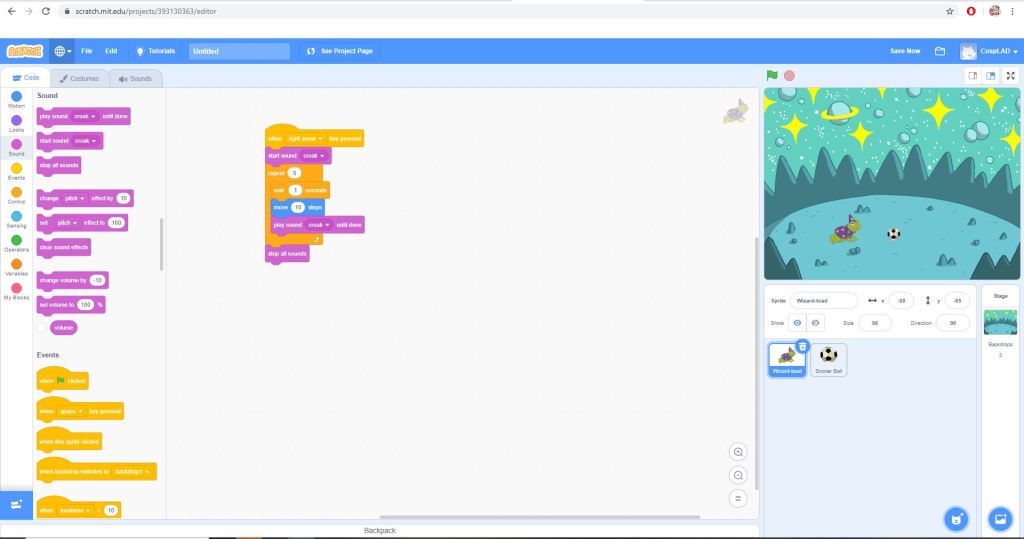
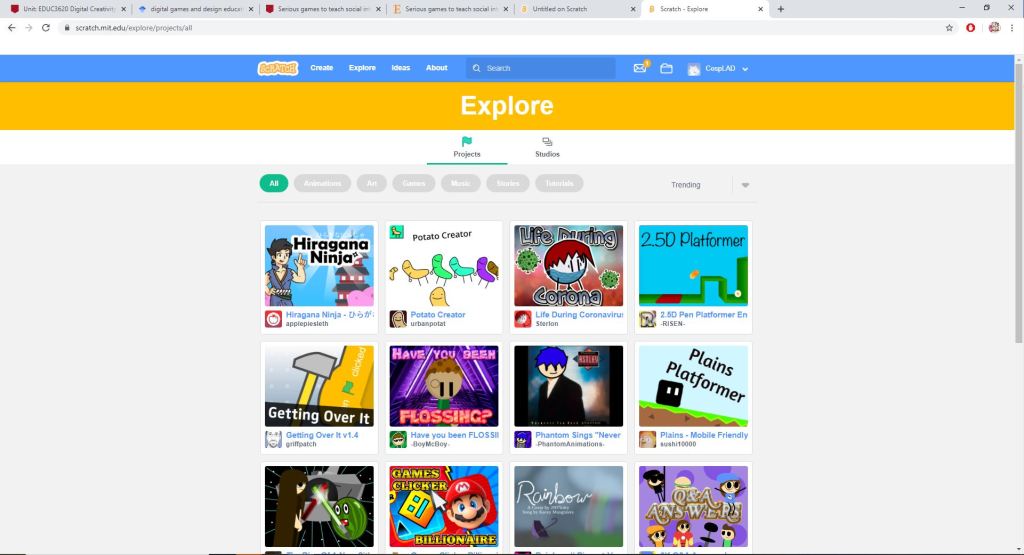
In my experience, games can be complicated and explicit designs or simple and user friendly, such as Scratch. Scratch is a block-based visual programming language and website mainly targeted at younger students (K-6). Scratch allows the users to create games and ideas using simplified coding blocks. Users can publish their finished designs freely online where other users can open and interact with, allowing people to explore different levels of creativity and ideas.
Image 1 Top Left: Basic interface of the Scratch Software Image 2 Top Middle: Building blocks are stacked and linked to create a function/purpose Image 3 Top Right: Audio can also be added the coding blocks. Image 4 Bottom: Scratch as a diverse online community that share their projects. Many users can easily browse to find different ideas and concepts
However, I don’t see the usage of Scratch beyond primary education. In a pedagogical sense, Digital games and designs can promote learning and critical development of creativity and higher order thinking. However, this requires professional learning by teachers in understanding the ICT language and how the software works to prevent interference with pedagogical planning. Furthermore, students may become distracted by digital games and focus less attention on the tasks, which can detrimentally lead ineffective teaching and learning; where learning is primary and entertainment is mostly secondary (Plaisent, Tomiuk, Perez, Mokeddem & Bernard, 2019).
Video 2: Andre Thomas shares his approach and findings on effectiveness of Game-Based Learning.
Nevertheless, research studies have shown that video games can yield experience on cognitive functions, including a positive correlation between task performance during probabilistic categorisation learning and positive effects on memory systems (Schenk, Lech & Suchan, 2017). Games in educational context can become unreplaceable assets in modern education, students can develop critical learning, higher order thinking skills/problem solving skills and most importantly, creative skills.
Reference
Australian Curriculum, Assessment and Reporting Authority (ACARA). 2020.
Costa, C., Tyner, K., Henriques, S., & Sousa, C. (2017). Digital Game Creation for Media and Information Literacy Development in Children. European Conference on Games Based Learning, 112-121.
Schenk, S., Lech, R., & Suchan, B. (2017). Games people play: How video games improve probabilistic learning. Behavioural Brain Research, 335, 208-214.
Virtual Reality is a trending and immersive technology based upon the user interaction and immersion into a digital world. Typically, VR immersion involves user adorning a pair of VR ‘goggles’ to view the virtual world in three dimension; as if the user has just entered a new world. Furthermore, VR also allows user control and interaction in the new world. In education, VR is slowly being adopted into classroom environments. VR comes in many different styles; simple VR headsets can be built using a mobile device and simple cardboard cut-out pieces while more sophisticated VR models incorporated motion control and hand controllers.
Video 1: VR being integrated into American Education as it brings a whole new dynamic to the classroom.
Virtual reality has brought major changes into the educative process. Learners will now learn through simulations as opposed printed textbook content. Furthermore, curriculum materials are no longer predominantly text-based, but imagery and symbol-based (Helsel, 1992). VR offers to move student learning from its “reliance on textbook abstractions to experiential learning in naturalistic settings” (Helsel, 1992). Critically, this grasps student engagement, involvement and develops student learning skills through critical thinking and development of the digital language when solving problems.
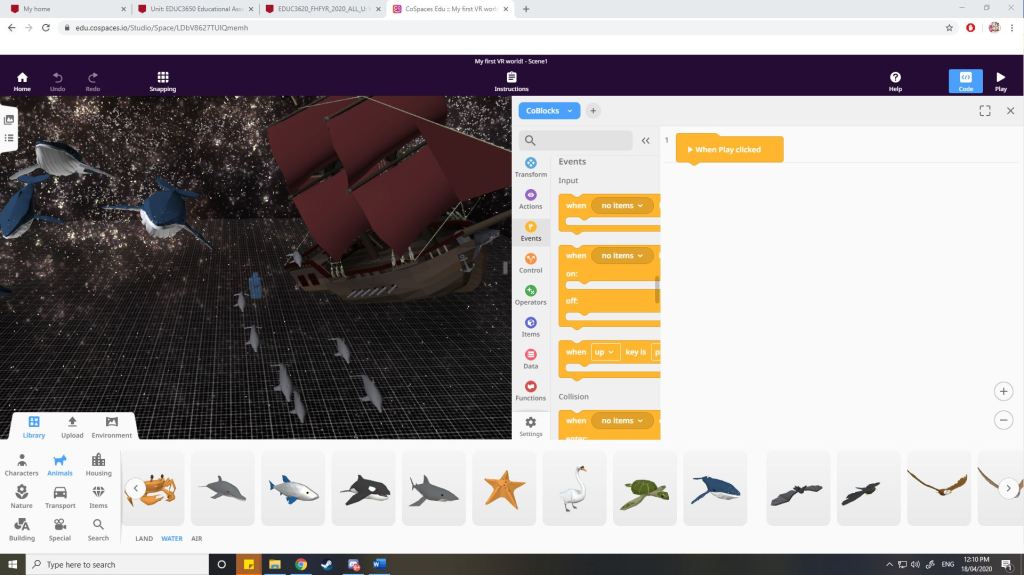
One such VR application that we used was called “CoSpaces”. It allows the construction of 3D environments through simple ‘drag and drop’ of objects or through more sophisticated coding processes. It can be accessible through PC or mobile devices. Furthermore, the application can be explored immersivity through the VR interaction. From an educative perspective, CoSpaces can be used by teachers to construct an interactive immersive world where students can explore. These worlds can be designed in ways where students can explore locations or scenarios which are less accessible/impossible in the real world. Students themselves can design assignments and activities around CoSpaces to present their information or presentations etc.
Image 1 Left: User interface of the created CoSpaces interaction Image 2 Middle: User tool palette that allows users to insert objects and content into their 3D virtual world. Image 3 Right: Coding aspect of the CoSpaces interface should users choose to code their 3D virtual world.
However, it should be noted that the effectiveness of VR in education depends on the professional skills of teacher utilising them and the learning responsibilities of students. VR itself may distract students from learning tasks and further considerations include as ethical, developmental, cognitive etc. Also, the pricing of VR can vary from depending the accessories, it varies from around $300 (Oculus Go) or less to up and including $2599 (HTC VIVE PRO EYE full kit). Never-the-less, VR can offer new pedagogical affordances and uses for the educational classroom, it provides educational qualities that are essential for the 21st century digital learning and for students.
Image 4 Above: A comparative table of the Virtual Reality apparatus available on the market. Note only 5 are selected for this comparison but there are many VR sets available on the internet. Image retrieved from https://cdn.nanalyze.com/uploads/2016/12/VR-Headsets-Comparison.jpg.
References:
Helsel, S. (1992). Virtual Reality and Education. Educational Technology, 32(5), 38-42. Retrieved April 27, 2020, from http://www.jstor.org/stable/44425644
Augmented reality has increasingly introduced new possibilities for teaching and learning. The coexistence of virtual objects and real environments allows learners to visualise complex spatial relationships and abstract concepts (Arvanitis et al., 2007), experience phenomena that is not possible in the real world (Klopfer & Squire, 2008), interact with 2D & 3D synthetic objects in the mixed reality ( Kerawalla, Luckin, Seljeflot, & Woolard, 2006), and develop important practices and literacies that other technology-enhanced learning environments cannot develop and enact (Squire & Jan, 2007; Squire & Klopfer, 2007; Wu, Lee & Liang, 2013).
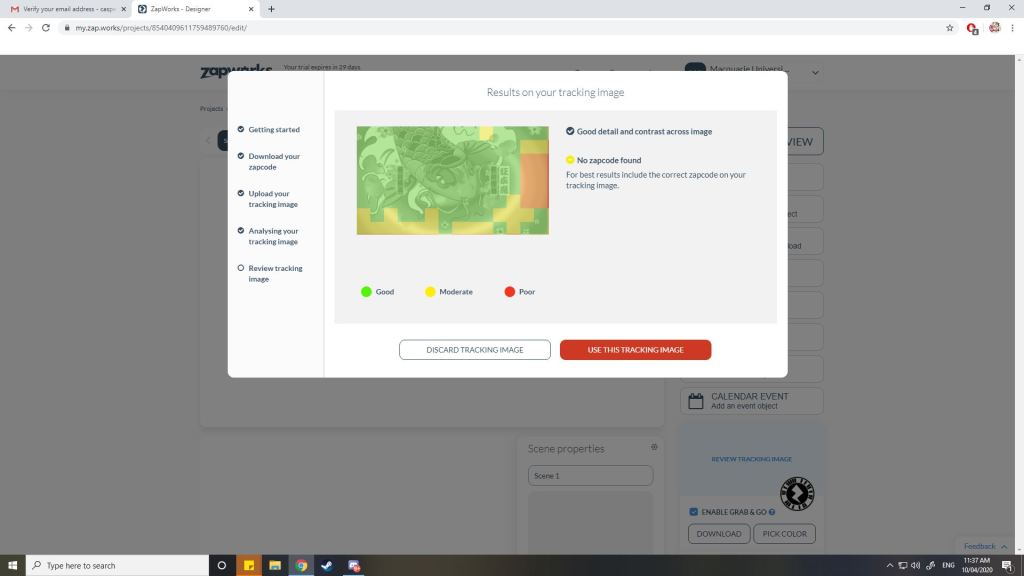
One such AR application that we have used is ‘ZapWorks’. It requires a user (or teacher) to create an augment reality experience that allows other users (or students) to scan the ‘ZapWork code’ with their mobile devices to experience AR. The creation of the AR experience is done through the website ‘ZapWorks’ designer tool section. You can upload an image which acts as the background to the augment reality and add overlays, videos text and even other images to the palette. Once the completed code has been scanned by a mobile device with the ZapWorks apps, the overlays can be brought up over the background image and users can experience the augment reality.
Image 1: ZapWorks interface, note the background image in the centre and the overlay tools on the right hand side
Furthermore, the initial interface for and user experience when designing an AR within ZapWorks was a little less friendly upon first impressions. However, the website does provide a tutorial video when you begin designing. Once you begin designing, you can upload an image which triggers the AR, this can be an image that students can have easy access to or is essential for them. It could take the form of an A4 piece of paper with the background image already on it.
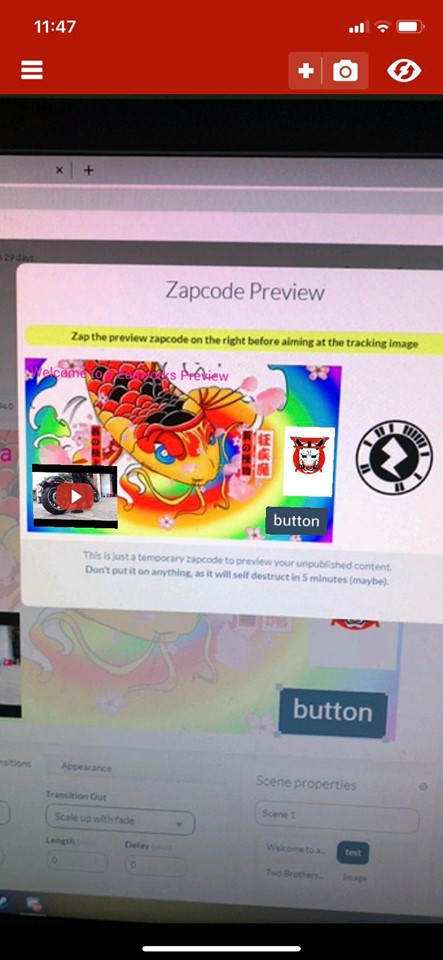
Image 2: Augmented Reality has been been applied to this image. (Preview)
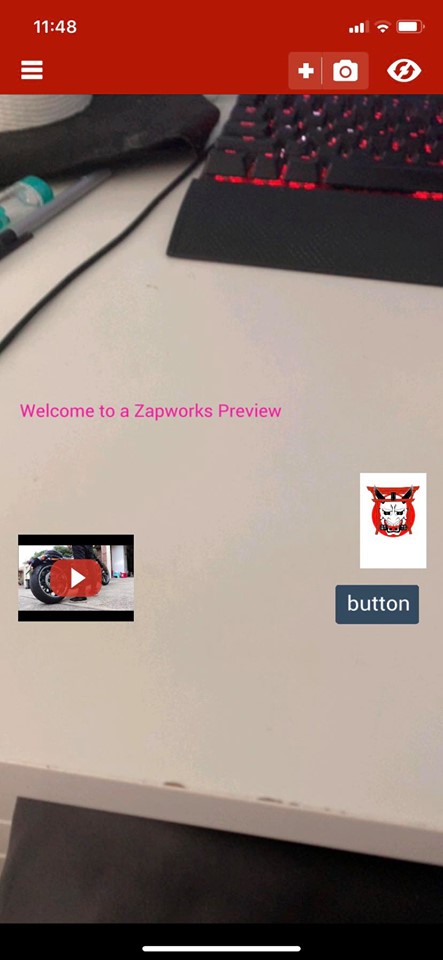
Image 3 Left: a Preview of the Augmented Reality using a mobile device to scan the code and aiming the camera over the background image. Image 4 Right: the overlays still appear on the screen even though the camera has moved away from the background image.
However, pedagogical issues should be taken into consideration when AR systems are implemented in classrooms. The use of AR systems may encounter constraints from schools and rejection among teachers. The nature of AR learning activities involves instructional approaches (participatory simulations and studio-based pedagogy) are quite different from the traditional teacher centred teaching methods (Kerawalla et al., 2006; Mitchell, 2011; Squire & Jan, 2007). Another issue involves how should the information be distributed and utilised between two realities and different devices (Wu et al., 2013). A set of design guidelines based on learning theories and empirical evidence would be useful to counteract this issue.
References:
Arvanitis, T. N., Petrou, A., Knight, J. F., Savas, S., Sotiriou, S., Gargalakos, M., et al. (2007). Human factors and qualitative pedagogical evaluation of a mobile augmented reality system for science education used by learners with physical disabilities. Personal and Ubiquitous Computing, 13(3), 243–250. http://dx.doi.org/10.1007/s00779-007-0187-7.
Kerawalla, L., Luckin, R., Seljeflot, S., & Woolard, A. (2006). “Making it real”: exploring the potential of augmented reality for teaching primary school science. Virtual Reality,10(3), 163–174.
Klopfer, E., & Squire, K. (2008). Environmental detectives: the development of an augmented reality platform for environmental simulations. Educational Technology Researchand Development, 56(2), 203–228. http://dx.doi.org/10.1007/s11423-007-9037-6.
Mitchell, R. (2011). Alien contact!: exploring teacher implementation of an augmented reality curricular unit. Journal of Computers in Mathematics and Science Teaching, 30(3),271–302.
Squire, K., & Jan, M. (2007). Mad city mystery: developing scientific argumentation skills with a place-based augmented reality game on handheld computers. Journal of Science Education and Technology, 16(1), 5–29. http://dx.doi.org/10.1007/s10956-006-9037-z.
Squire, K., & Klopfer, E. (2007). Augmented reality simulations on handheld computers. Journal of the Learning Sciences, 16(3), 371–413. http://dx.doi.org/10.1080/10508400701413435.
Wu, H.K., Lee, S.W.Y., Chang, H.Y. & Liang, H.C. (2013). Current Status, opportunities and challenges of augmented reality in education. Computers & Education. 62, 41-49.
In the last few years, robotics in education has slowly emerged in the form of a robotic model being behaviourally controlled by a virtual environment. However, the educational purpose and theories behind this robotics were limited to introductions to robotic technologies in STEM subjects and had minimal pedagogy support in such lessons (Alimisis, 2012).
Nowadays, robotics in education refers to a broader range of activities, programs, physical platforms and educational resources. Fundamentally, beneath the physical elements lies a pedagogical philosophy that matches the new ‘Digital Technologies’ curriculum. Furthermore, teaching robotics in schools can benefit a)student engagement and interests, b)students development of 21st century skills, c)inclusive activities suitable for students with different ranges of abilities, d)development of students’ critical and computational thinking skills and e)effective way of introducing programming to students. Most importantly, through the creation, design, assembly, and operation of robots, educational robotics can strengthen and support students’ skills in developing their knowledge (Innovative Tech, 2017).
Video 1: Ayden Haoken seeks to share his unique perspective on the role of robotics in education.
However, for successful integration through a constructivist theoretical framework, teachers should undertake educational courses and training programs in robotics. Teachers without adequate training and knowledge will achieve minimal efficiency in integrating robotics in education as the role of the teacher is to organise, coordinate and facilitate learning for students. The teacher organises the learning environment, raises discourse, discreet assistance when necessary and encourages students to work “with creativity, imagination and independence and finally organises the evaluation of the activity in collaboration with students” (Alimisis, 2012).
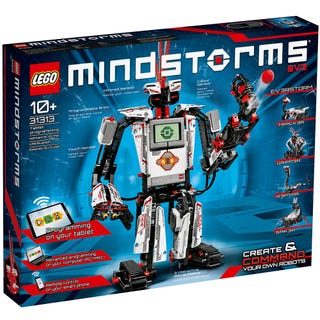
Furthermore, educational robotic kits such as ‘Lego Mindstorm’ introduces hardware and software structure which allows users to develop programmable robots using Lego. Kits such as the Lego EV3 that we had to research, comes with countless differently types of sensors (e.g. motion, light, motor rotation etc.). Although it comes at a steep price around $500AUD, there are cheaper robotic kits available on the market such as ‘Bee-Bot’ ($89.95). However, the functions and sensors are more limited and less complex in terms of programming. Never-the-less, classroom activities can be done with different types of robots depending on the intended task. Through online archives, teachers and students can access large volumes of resources and designs for robotic based activities.
Image 1: Lego MindstormsImage 2: An endless example of what you can build in mindstorm to suit different purposes and functions
I personally believe robotics in education is vital for students in the 21st century. 21st century skills including foundational literacy, competencies and character qualities are all exhibited through robotics in education. It also prepares students for future employment.
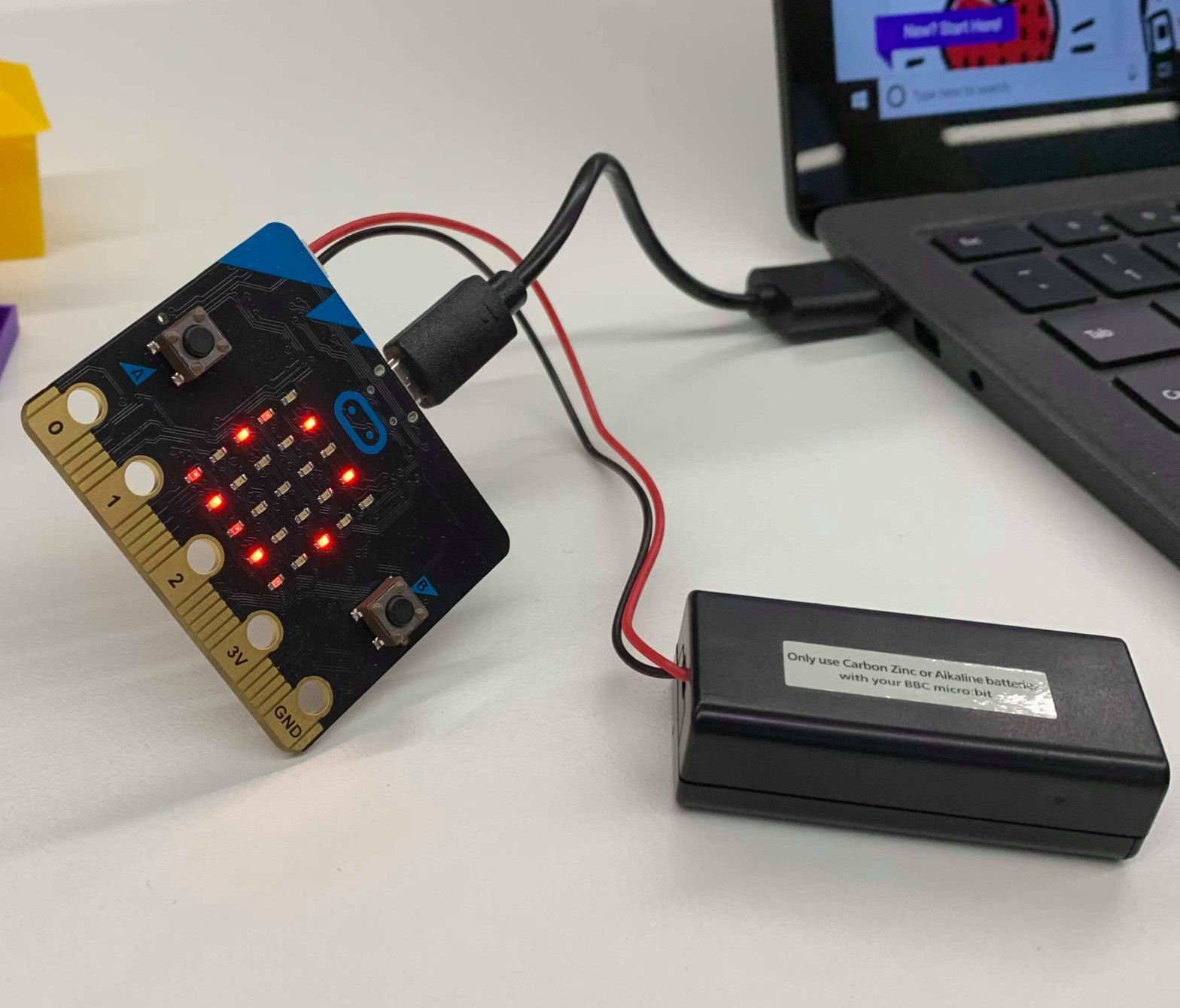
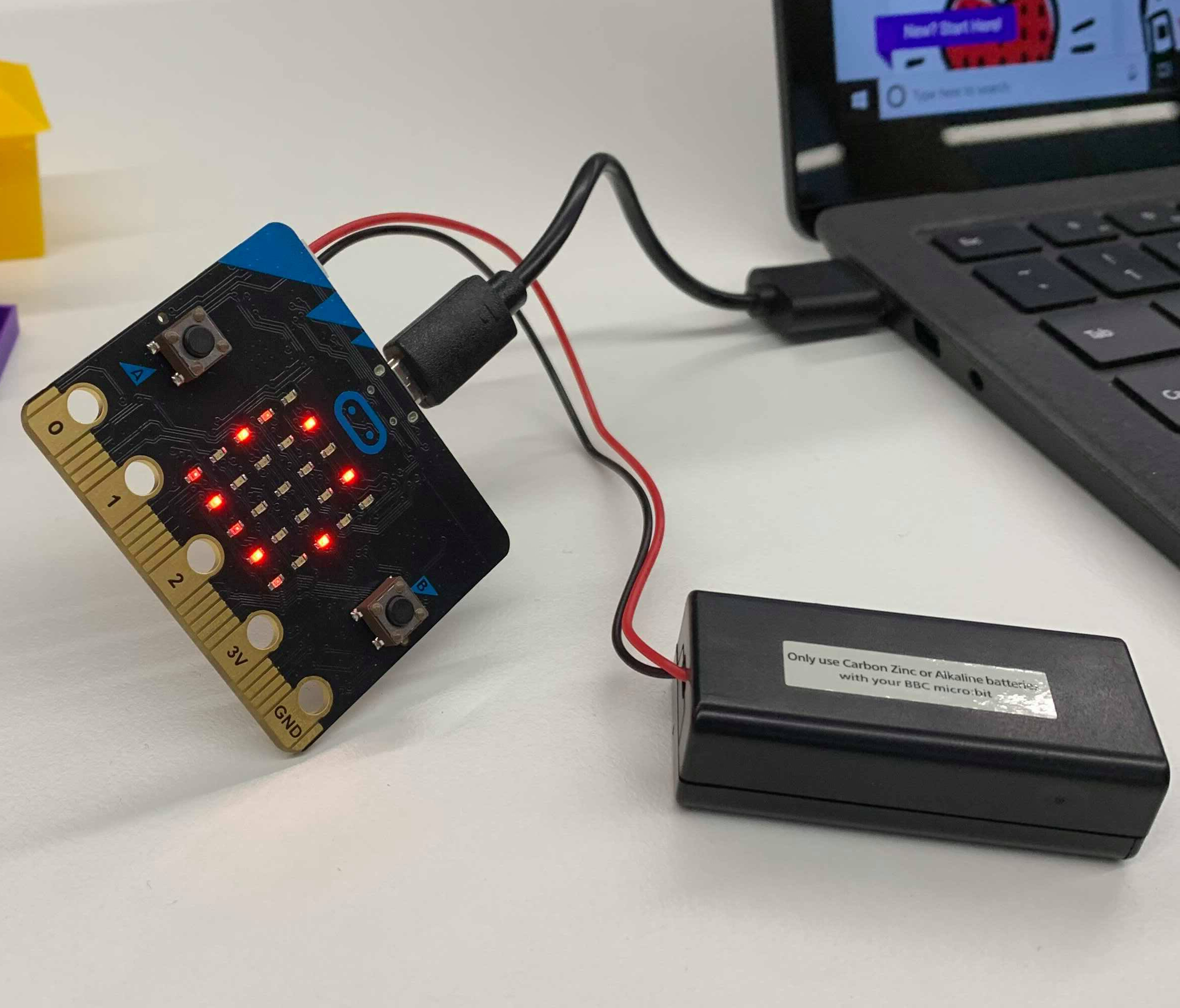
Image 1: Micro:bit connected to laptop and battery pack.
Casper Wang – 44637586 – 30/3/2020
When someone says that they have a computer that is smaller than their palm, would you believe them? With technology evolving at an exponential rate, modern technology has allowed the development of pocket-sized computers, and that is exactly what Microbit is. Microbit is an affordable small computer chip that has 25 red LED lights that can be programmed to flash messages and use to create games. The chip also has two programmable buttons that can be used to control games or pause/skip songs on a playlist. It has an accelerometer that detects motion. The Microbit motherboard also has a built-in compass. Finally, it can use low energy Bluetooth connection to interact with other devices and even the internet. Computational thinking can be shown through Micro:bit.
Computational thinking is a term which describes structured thinking or algorithmic thinking to produce appropriate output to a given input (Dennings, 2009). Computational thinking involves four stages (Angeli & Giannakos, 2020): 1) Decomposition of problems into simpler parts. 2) Developing Algorithm, step-by-step solutions to problems. 3) Data analysis, recognising and generalising patterns. 4) Abstraction, reducing complexity by defining a main idea. In educational curriculum capabilities, students are expected to integrate ICT capabilities into their learning, hence computational thinking is involved as a digital literacy.
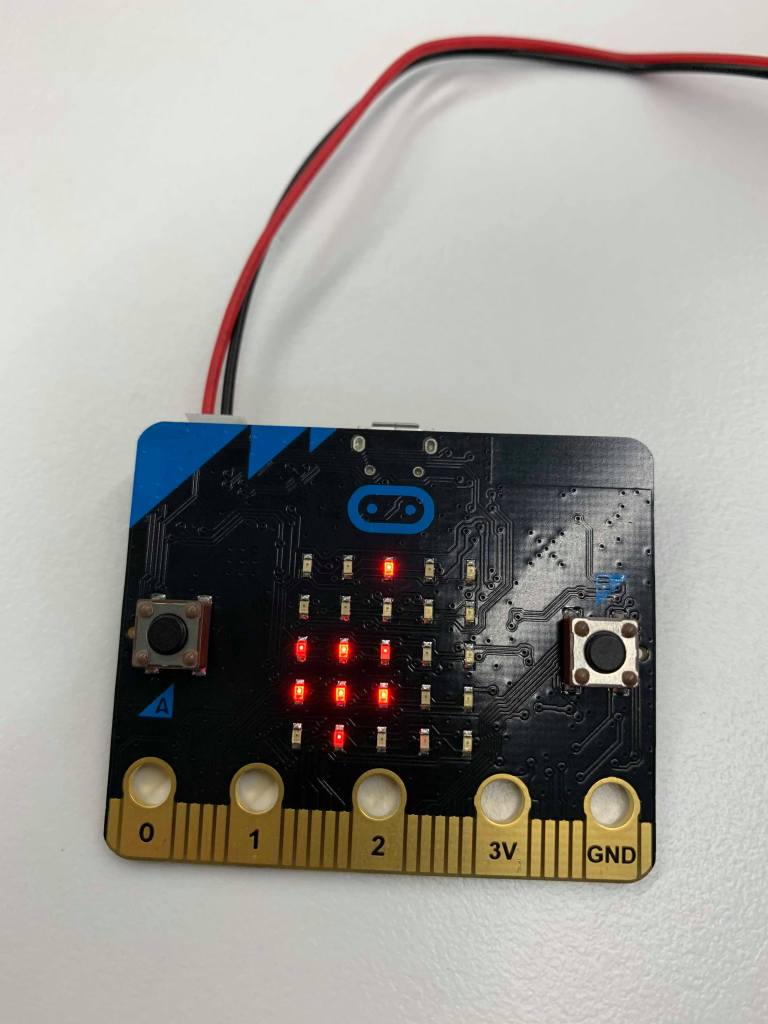
Image 2 Left: Micro:bit displaying ‘Shakas’ (our version of scissors) Image 3 middle: Paper Image 4 Right: Rock Please note that the LED display are flashing signals, the image captured by the camera captures the exact flash, hence incomplete images.
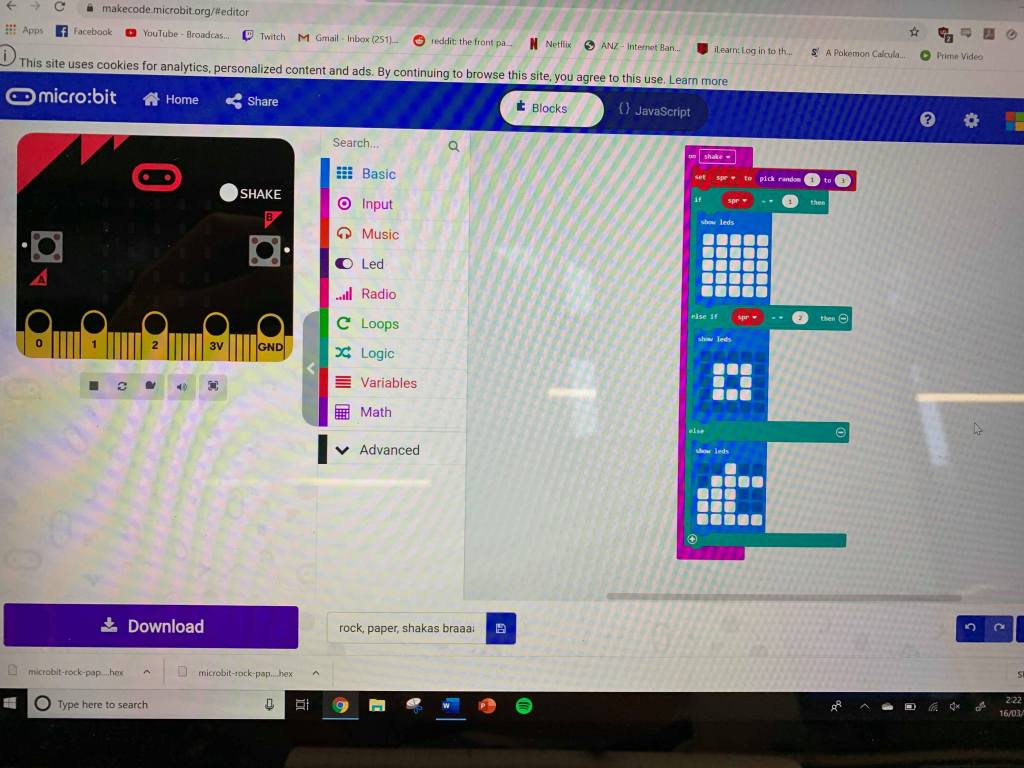
Computational thinking can be introduced into students through Microbit. A teacher can structure an entire class plan into programming a microbit to perform certain functions. For example, we were provided with a microbit kit and were required to code the microbit for a classical game of “Rock, papers, scissors”. A simple yet effective task that can be implemented to students across primary and secondary. By connecting the microbit to a computer and entering the microbit website, we can select the “MakeCode editor” and build command prompts for the microbit. The simplicity in this coding instruction is that the coding itself is using ‘blocks’ which are simplified coding commands that can be stacked. Advanced users may also test their abilities and skills by coding in ‘JavaScript’.
Image 5: Micro:bit code editing using “Blocks”, note the white blocks as the displayed image once accelerometer detects movement (shaken).
Computational thinking can be developed through technology such as microbit as a way of designing curricula and classroom activities with a focus on a broader set of computational thinking skills; not just coding (Angeli & Valanides, 2020). Both primary and secondary education benefits from early development of computational thinking skills.
References
Angeli, C., Giannakos, M. (2020). Computational thinking education: Issues and Challenges. Computers in Human Beheaviour vol. 105. https://doi.org/10.1016/j.chb.2019.106185
Angeli, C., Valanides, N. (2020). Developing young children’s computational thinking with educational robotics: An interaction effect between gender and scaffolding strategy. Computers in Human Behaviour. vol. 105. https://doi.org/10.1016/j.chb.2019.03.018
Denning, P. J. (2009). Beyond computational thinking. Communications of the ACM, 52(6), 28-30.
As the world evolves through the digital age, the technology application too begins to evolve. One such application is “Sketchup”. A free 3D modelling software which allows users to ‘make anything they can imagine, without downloading anything’. From an educational perspective, Sketchup is an important ICT designed tool builds upon creativity and spatial skills.
Sketchup is a free software online that requires no installation, easy to access and use. Students and teachers can easily access Sketchup from school and from home. User interface in Sketchup is simple with the tools organised in a simple palette to the side of the program. Users can immediately start modelling from the point of origin where the direction of the x-, y- and z- axis are colour coded to represent the axis in which the tools are being applied to along the canvas planes. Study results have shown that the use of dynamic geometric tools (3D modelling) has a positive effect on learners’ spatial progressions (Toptas, Celik, Karaca, 2012).
Image 1: The Free SketchUp website.
Furthermore, the simple geometric tools in SketchUp allows the modelling of objects in different forms and sizes. The software further allows the editing of specific designs (such as compacting a shape or increasing the size, adding shapes, trimming down edges etc.). In primary and secondary education, teachers can construct lessons that require students to create 3D models of an object (whether simple or sophisticated) or even model scientific items such as cells. Although 3D modelling may be more advanced for primary education (depending on the modelling use), it never the less allows students to develop creativity and spatial thinking abilities (Toptas et al, 2012; Hansen, 2018).
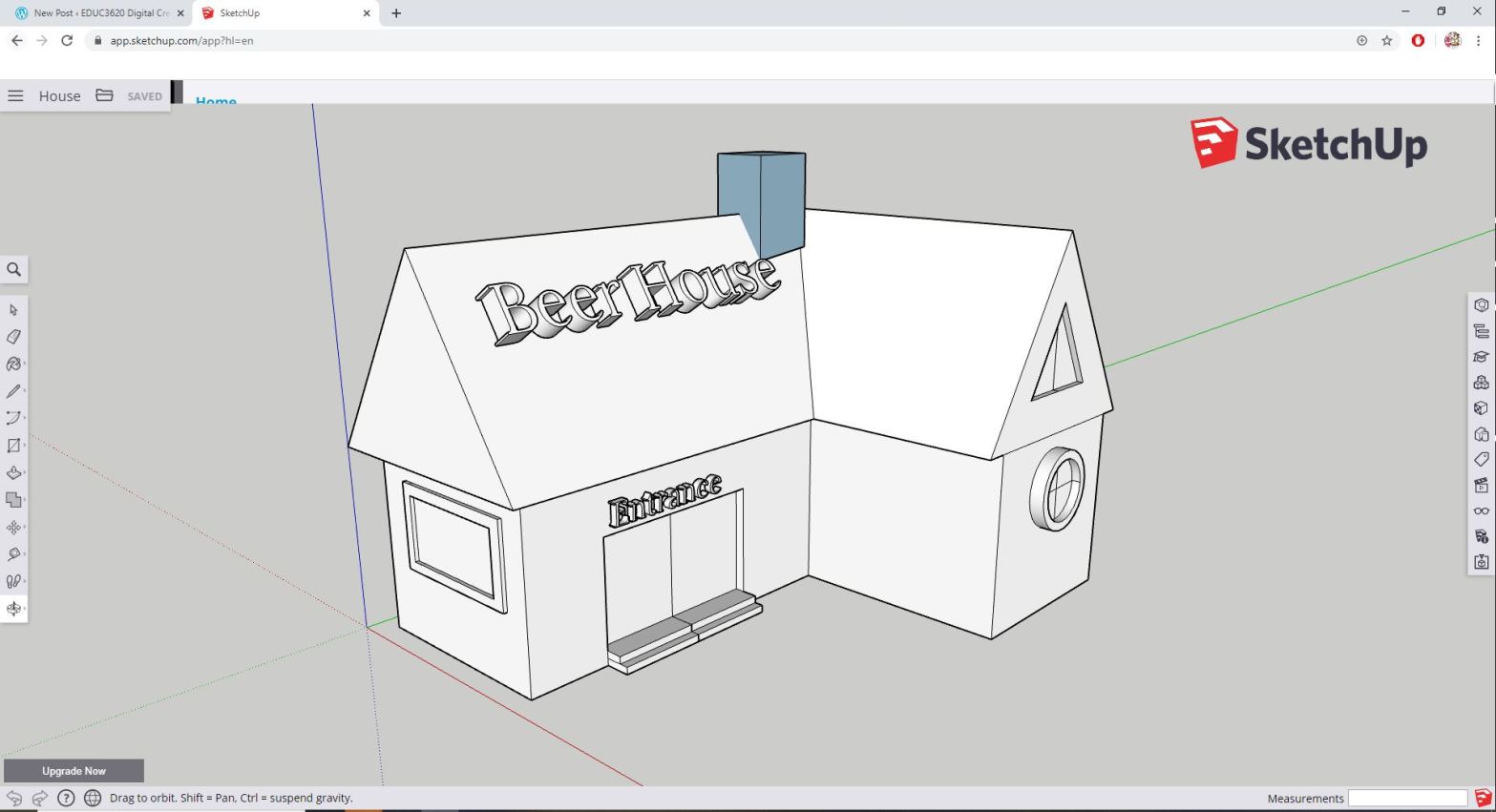
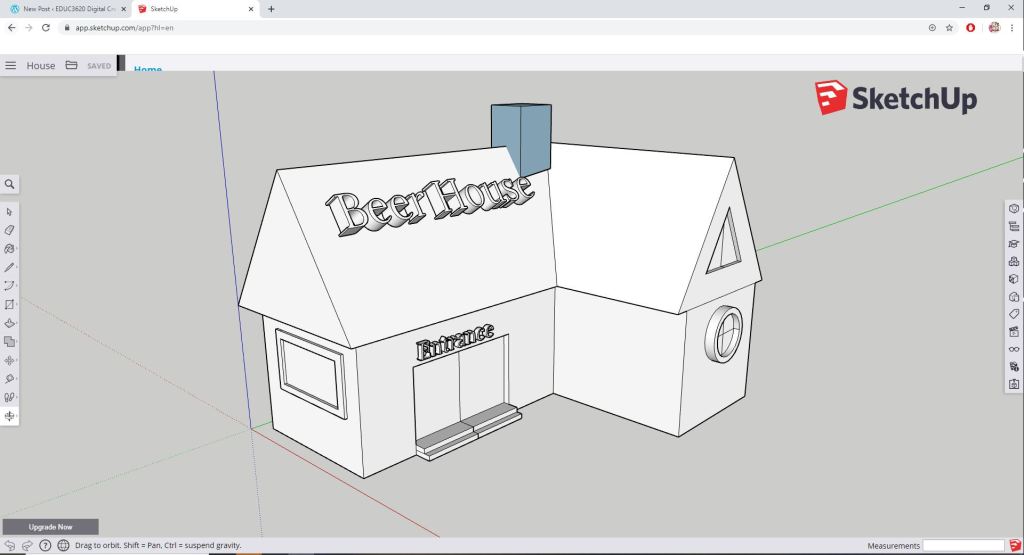
Image 2: A 3D modelling of a “Beer House”. Notice the palette of tools on either side of the program and the minimalist interface which allows easier interactions by users. Also note the different coloured axis (x- axis is red, y- axis is blue, z-axis is green).
However, without adequate software learning and practice, teachers and students may encounter difficulties when modelling more sophisticated designs. When editing from a different angle in the software, the user’s cursor may be modelling/editing in an unintended axis and construct objects in error. However, simple errors can be remediated once teachers and students are more familiarised with the software. Online tutorials including video and articles are published all over the internet which allows easier learning by both teachers and students in using the software.
Video 1: Sketchup tutorial for beginners – Part One. Courtesy of MasterSketchUp on YouTube for the video tutorial.
Also, the free software is limited in its ability to only model objects without emulating mechanical moving components. However, with the right modelling, a 3D printed object may move mechanically.
More importantly, Sketchup progress can be saved and exported for 3D printing as students can print the fruits of their efforts which also allows the physical interaction in learning (for more information click here).
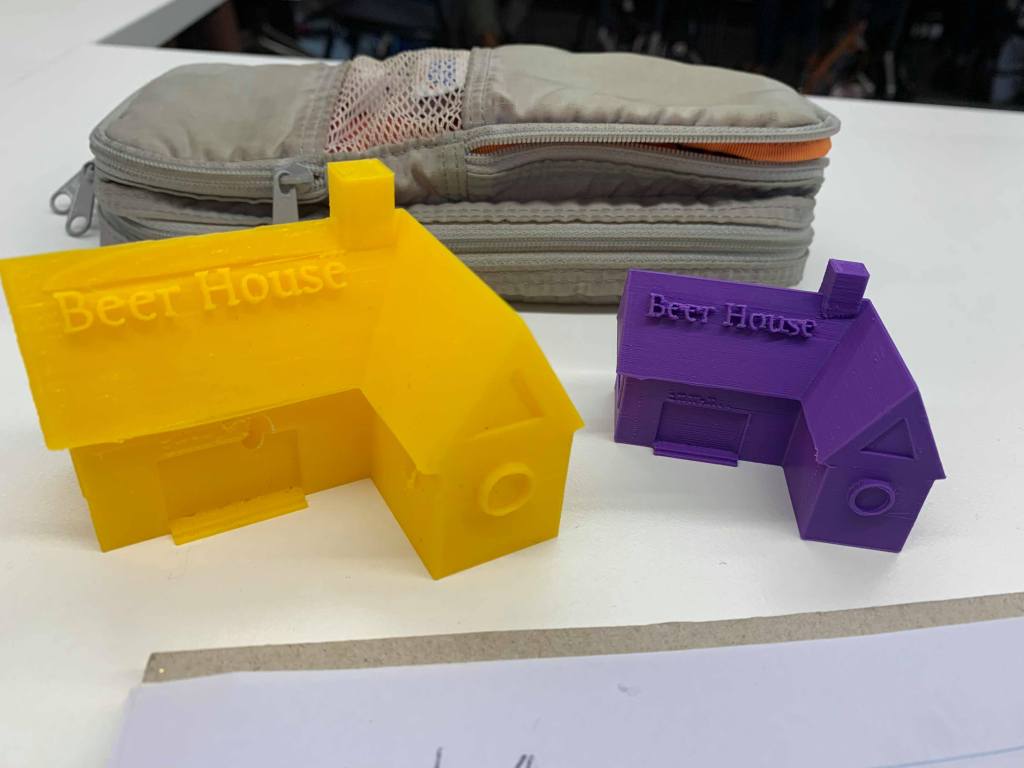
Image 3: 3D printed version of the 3D modelling. This allows physical interaction for teachers and students in education and promotes creativity and experimental design.
The user-friendly interface of Sketchup makes it ideally for primary education. However, it may also be used in secondary education dependent on the subject and skill level required for the 3D modelling. In education, Sketchup can prepare students for real world situations and problem solving as it builds upon ICT skills, spatial thinking abilities and a strong sense of mathematical awareness for inside and outside the modelling classroom.
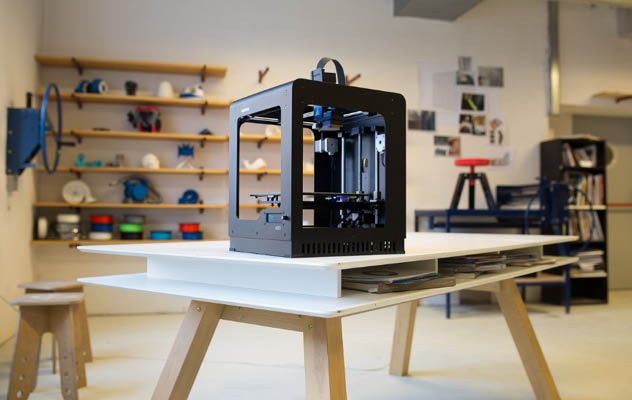
As the global economy continuously evolves, 3D-printers are becoming more interesting and common in schools around the globe. It operates in ways that extrudes molten plastic through a tiny nozzle that moves around a targeted area under computer-controlled precision (Woodford, 2020). In recent times, 3D-printers are integrated into classroom curricula to achieve positive effect on student critical skills development and to achieve greater student engagement (Zimmerman, 2018). As the 21st century learning skills emphasizes on creativity, critical thinking and technological skills etc., it becomes questionable in how beneficial 3D printers are to the educational classroom and to what extent does it involve student engagement.
With the growing importance of STEM subjects, 3D-printing has a greater impression upon schools across Australia. Teachers can utilize 3D-printers to bridge the gaps between learning styles of different students that enables the element of physical reality to otherwise abstract ideas (Hahn, 2017), which can enhance learning when ideas and concepts are presented in both concrete and abstract terms, through visual and physical forms (Hahn, 2017; Huebner, 2008).
Research shows that students involved in 3D-printing-based activities have developed 21st century skills including creativity, problem solving skills and critical thinking (Bower, Stevenson, Falloon, Forbes and Hatzigianni, 2018). This aligns with Bloom’s taxonomy which allows students to pursue creative thought/design (Yale, n.d.), further development of student teamwork skills, improved student participation, active learning, creative thinking and may potentially turn subjects into careers (Bower et al., 2018; Reid, 2018).
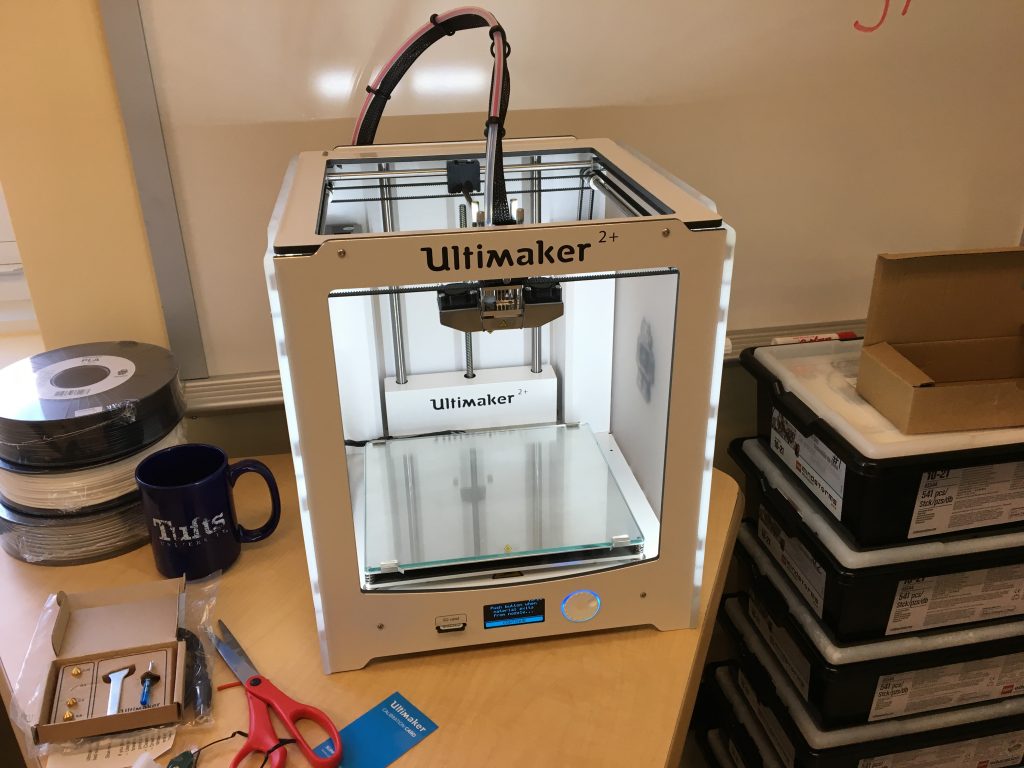
A 3D-printer Ultimaker 2+ with a price tag of $2499. Herrman, J. (2017). Ultimaker 2+ 3D Printer before it was used. Retrieved from https://kidsengineer.com/?paged=2
However, the upfront cost per 3D-printing unit averages around the $1000 AUD mark (however, inexpensive models do exist) which may be disconcerting to schools with limited budget access. Furthermore, difficulties in object calibration, teachers learning the programs professionally (Bower et al., 2018), application being distractions for students and literacy difficulties in younger students can hinder creative thinking progress. However simplified user interface can mitigate some difficulties. Furthermore, students can print out dangerous items; although preventable through software limitations. Further limitations includes malfunctioning, cost of accessories, maintenance and printing speed. However, it promotes problem solving and perseverance for teachers and students to diagnose and attempt to fix the problems (Bower et al., 2018).
3D-printing encourages students to be creative and innovative through trial and error. As such, it allows them to remember the facts and lessons learnt (Bower et al., 2018; Reid, 2018). 3D-printing enables students to foster and develop creative processes through the correct investment, motivation and engagement with the technology.
This is an example post, originally published as part of Blogging University. Enroll in one of our ten programs, and start your blog right.
You’re going to publish a post today. Don’t worry about how your blog looks. Don’t worry if you haven’t given it a name yet, or you’re feeling overwhelmed. Just click the “New Post” button, and tell us why you’re here.
Why do this?
Because it gives new readers context. What are you about? Why should they read your blog?
Because it will help you focus you own ideas about your blog and what you’d like to do with it.
The post can be short or long, a personal intro to your life or a bloggy mission statement, a manifesto for the future or a simple outline of your the types of things you hope to publish.
To help you get started, here are a few questions:
Why are you blogging publicly, rather than keeping a personal journal?
What topics do you think you’ll write about?
Who would you love to connect with via your blog?
If you blog successfully throughout the next year, what would you hope to have accomplished?
You’re not locked into any of this; one of the wonderful things about blogs is how they constantly evolve as we learn, grow, and interact with one another — but it’s good to know where and why you started, and articulating your goals may just give you a few other post ideas.
Can’t think how to get started? Just write the first thing that pops into your head. Anne Lamott, author of a book on writing we love, says that you need to give yourself permission to write a “crappy first draft”. Anne makes a great point — just start writing, and worry about editing it later.
When you’re ready to publish, give your post three to five tags that describe your blog’s focus — writing, photography, fiction, parenting, food, cars, movies, sports, whatever. These tags will help others who care about your topics find you in the Reader. Make sure one of the tags is “zerotohero,” so other new bloggers can find you, too.











 EDUC3620 Digital Creativity and Learning - CW